kali ini kita mencoba membuat checkbox pada android dengan hanya satu checkbox yang dapat di klik
file xmlnya
<LinearLayout xmlns:android="http://schemas.android.com/apk/res/android"
 xmlns:tools="http://schemas.android.com/tools"
 android:id="@+id/LinearLayout1"
 android:layout_width="fill_parent"
 android:layout_height="fill_parent"
 android:orientation="vertical"
 tools:context=".Checkbox1" >

<CheckBox
 android:id="@+id/ck1"
 android:layout_width="wrap_content"
 android:layout_height="wrap_content"
 android:text="Sate" />

<CheckBox
 android:id="@+id/ck2"
 android:layout_width="wrap_content"
 android:layout_height="wrap_content"
 android:text="Nasi Goreng" />

<CheckBox
 android:id="@+id/ck3"
 android:layout_width="wrap_content"
 android:layout_height="wrap_content"
 android:text="Soto" />

</LinearLayout>
file javanya
package com.example.checkbox1;

import android.app.Activity;
import android.os.Bundle;
import android.view.View;
import android.view.View.OnClickListener;
import android.widget.CheckBox;
import android.widget.Toast;
public class Checkbox1 extends Activity {
 CheckBox ck1,ck2,ck3 ;
 @Override
 protected void onCreate(Bundle savedInstanceState) {
 super.onCreate(savedInstanceState);
 setContentView(R.layout.activity_checkbox1);
 ck1 = (CheckBox) findViewById(R.id.ck1);
 ck2= (CheckBox) findViewById(R.id.ck2);
 ck3 = (CheckBox) findViewById(R.id.ck3);

 OnClickListener perintah = new OnClickListener() {

@Override
 public void onClick(View v) {
 CheckBox id = (CheckBox) v;
 //biar salah satu saja yang terchecked
 if(id.getId()== ck1.getId())
 {
 ck2.setChecked(false);
 ck3.setChecked(false);
 }
 else if(id.getId()== ck2.getId())
 {
 ck1.setChecked(false);
 ck3.setChecked(false);
 }
 else if(id.getId()== ck3.getId())
 {
 ck1.setChecked(false);
 ck2.setChecked(false);

}
 //memberi pesan
 Toast.makeText(Checkbox1.this, "anda memilih : "+((CheckBox) v).getText().toString(), Toast.LENGTH_SHORT).show();

 }
 };

 // set masing 2 listener untuk klik pada checkbox
 ck1.setOnClickListener(perintah);
 ck2.setOnClickListener(perintah);
 ck3.setOnClickListener(perintah);

 }


}
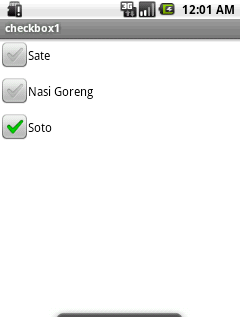
semoga berguna 🙂




 Ambilgratis.com - kami mengumpulkan informasi yang terserak dan tersebar
tinggalkan pesan